
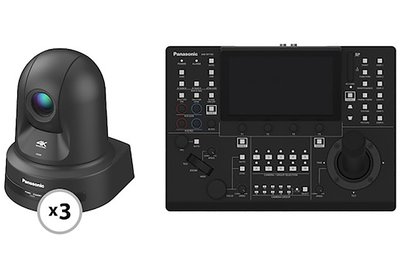
Panasonic AW-UE80KPJ 4K Pro PTZ 3-Camera and Controller Kit
Expand 
Important Shipping & Office Update: While our Concord headquarters is closed today for the Blizzard of '26, your orders are still moving! Our Memphis, TN distribution center is unaffected and shipping orders nationwide.
If you have questions about an upcoming rental, please reach out to us at 877.578.4777 or service@lensprotogo.com.

The Panasonic AW-UE80KPJ 4K Pro PTZ 3-Camera and Controller Kit consists of three AW-UE80KPJ Cameras & a RP150G Controller. Key features include:
1/2.5-inch 4K CMOS sensor
HDMI, SDI, and IP video output
Touch Panel GUI, Touch Focus & More
New joystick for one-handed operation
Pro-Grade 4K PTZ Camera. The Panasonic AW-UE80KPJ 4K Pro PTZ Camera fits right into professional productions, conferences, or classrooms. It outputs UHD 4K video at up to 60p over HDMI, Full HD at up to 60p over SDI, and supports live streaming up to Full HD 60p.
Built-In 24x Optical Zoom Lens. The built-in 4.1 to 98.9mm (25 to 600mm 35mm equivalent) 24x optical zoom lens gives you a wide 74° viewing angle. At its wide end, the lens lets you capture cinematic wide shots when you’re shooting in confined spaces. Its optical design includes aspherical elements to combat aberrations while producing 4K image quality. This camera features smooth, responsive pan and tilt, with a -175° to +175° panning angle and a -30 to 90° tilt range. In addition to the 24x optical zoom, there are also two extended digital zoom options: 28x UHD 4K digital zoom and 36x Full HD digital zoom.
Camera Inputs and Outputs. This camera uses an RJ45 ethernet port for NDI, but also features simultaneous video output via SDI and HDMI. A single 3.5mm mini jack allows for an unpowered line-in audio source.
Full Control At Your Fingertips. Panasonic’s Touchscreen Remote Camera Controller allows you to control up to 200 compatible Panasonic PTZ cameras over IP via a switching hub. Or you can control five cameras via a direct RS-422 connection. Please see the list of supported cameras in the Features section below. The controller features a zoom/focus rocker on the joystick for pan and tilt operations, many onboard buttons, and additional controls within the 7" touchscreen LCD. It also has an SD card slot, which allows saving scene files, system settings files, and other camera settings as well as copying settings over to other cameras.
The controller’s default IP address is 192.168.0.9.
Upon initial startup, you must follow these steps:
1. Access the camera via the webUI. The IP address is 192.168.0.10 and the Subnet is 255.255.255.0
2. Assign an account name and password.
3. Reboot the camera to log back in. You’ll be prompted to enter the initial network settings.
It will not. This product will only work with select Panasonic PTZ cameras.
No, this camera doesn’t support microSD recording.
You can monitor camera view via webUI, SDI / HDMI, and compatible third-party software.
This camera uses NDI HX2 protocol, so we recommend making sure all third-party software is up to date.
NDI is a high quality/high bandwidth streaming output while NDI|HX is high efficiency/low bandwidth streaming output. Use depends on your network setup.
Turn off the camera and flip up the first IR switch and first Settings switch on the back of the camera and power cycle. Once power cycled, unplug the camera and flip the switches back off. Once camera is powered back on it will be at its original factory settings.
Access the webUI and go to setup at the top
Enter username and password if prompted
Select the Network tab
Select Streaming Format
Select High Bandwidth NDI or NDI|HX2 under drop down menu and set.
| Brand |
Panasonic |
| Camera |
Physical
Environmental Operating Temperature
Power PoE Support
Interfaces Video Output Connectors
Control Move Speed
Video Output Broadcast System Compatibility
Lens Optical Zoom Ratio
Camera Shutter Speed
Image Sensor Image Sensor
Mfr. Model Number
|
| Item Type |
Package |
| Package Type |
PTZ Video |
| Remote Controller |
Other I/O
Power
Screen Resolution
Physical Dimensions:
Video Connectors
|


